What do your fixed bills cost a year? And which ones are too high?
One bank statement in, and within a minute you see what your fixed bills cost a year and which contracts are worth comparing. Works with ING, ABN AMRO, Rabobank and any other Dutch bank.
The check: no account, no email, your statement stays in your browser · The app: 30 days free, then €2.99/month or €29/year
🔒 No bank linking required — your data stays on your device and never reaches our servers.
Works with:INGABN AMRORabobankbunqSNSASN+ more
Money check
Your fixed costs creep up without you noticing. MuntLab notices.
Every month you add a statement, MuntLab puts your fixed costs next to last month's. You see straight away what got more expensive, what is new and what stopped.
✓ Each fixed cost: what it costs you extra per year
✓ Your health insurance: how many days you have left to switch, with your own premium
✓ Put what you find aside: a savings goal for your holiday, and you see if you will make it in time
✓ It all happens in your browser. Your statements go nowhere
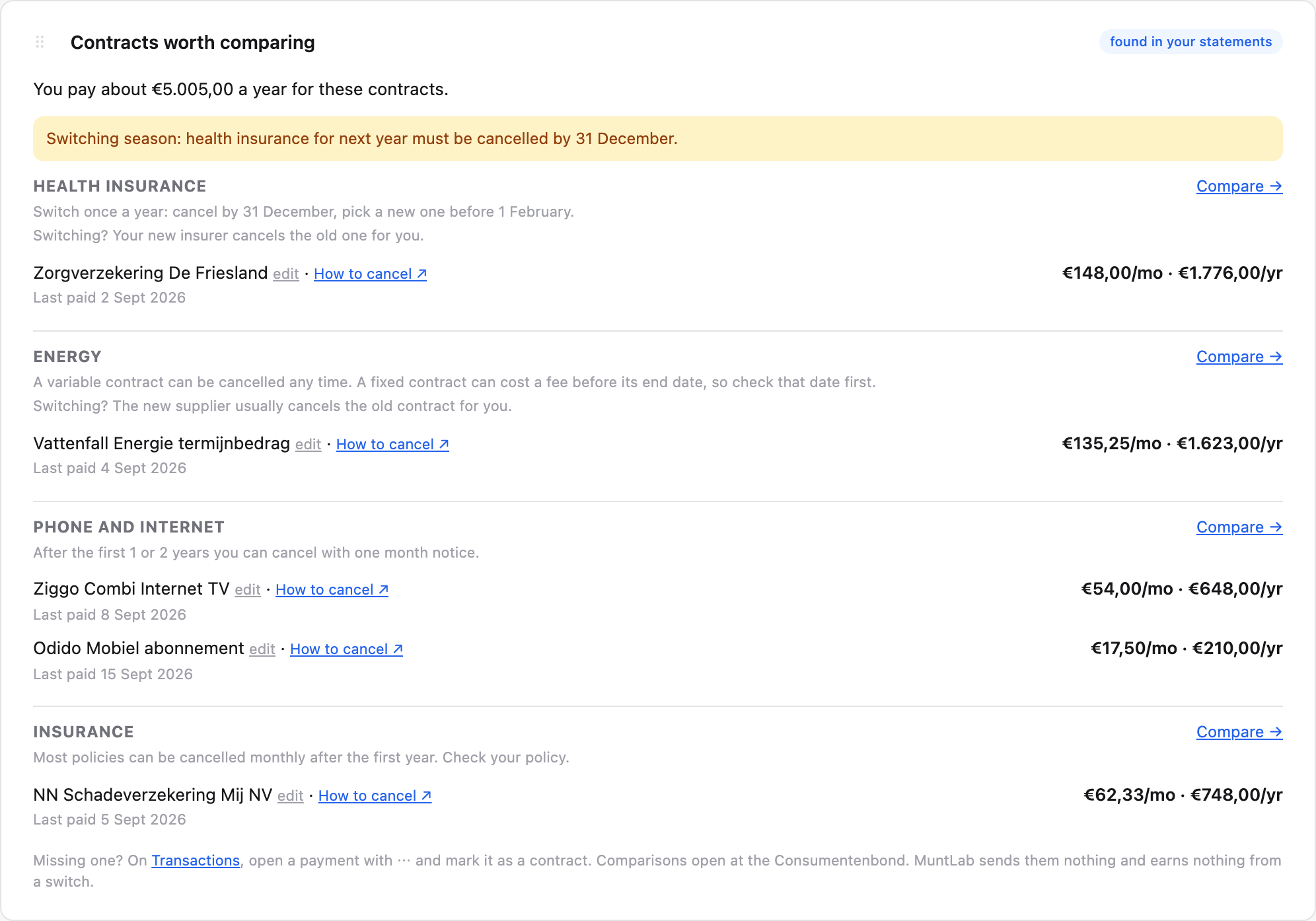
Health insurance: you can switch until 31 December
Your current premium is shown, with a link to the Consumentenbond comparison.
What MuntLab finds in your statements
Made with sample data. With your own statement you see your own amounts.
Your fixed contracts per year, with a cancel link for each provider
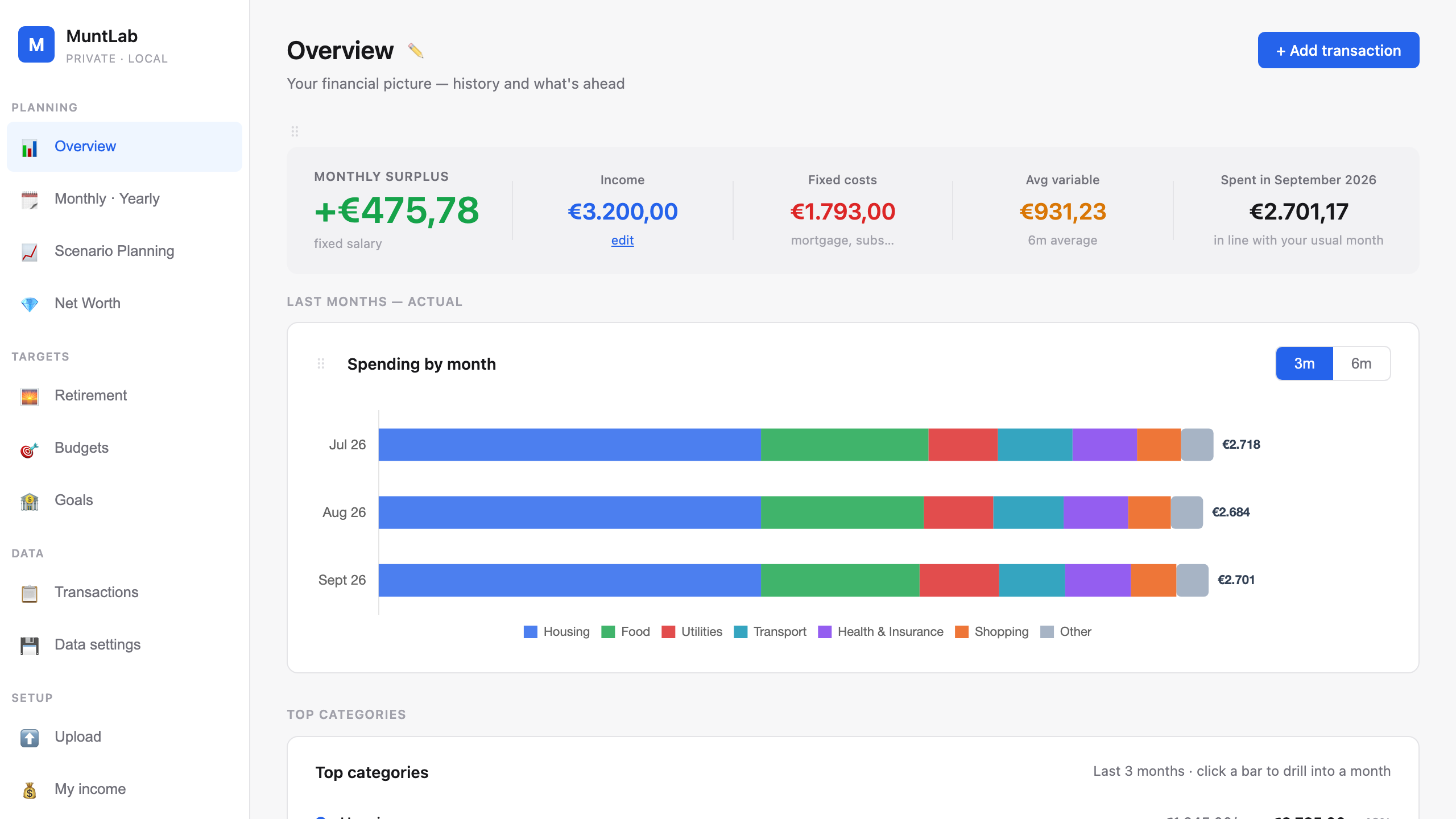
Your month at a glance: what comes in, what is fixed, what is left
Statement in, done. What is already there is skipped.
🔒
Most finance apps store your data on their servers. MuntLab doesn't.
Your transactions are processed in your browser and stored on your device — not ours. No cloud account. Sync is optional and end-to-end encrypted, so we never see your data. GDPR by design, not policy.
Check it yourself: open your browser's network tab (F12) while you upload. Your statement goes nowhere.
How it works
From bank statement to insights in 60 seconds
No manual entry. No bank connections. Just upload and understand.
1
Upload your statement
Export a PDF, CSV or Excel from your bank app and drop it into MuntLab. ING, ABN AMRO, Rabobank and more are supported out of the box.
2
AI categorises everything
MuntLab's smart engine automatically assigns categories to every transaction — groceries, rent, dining, subscriptions. You can adjust and it learns.
3
See your full picture
Instantly see where your money goes, track budgets, forecast your cash flow 12 months ahead, and model life changes with scenario planning.
See it in action
Try it on your own statement
Drop in your bank export and see exactly where your money goes — free for 30 days, then €2.99 a month.
app.muntlab.com
Features
Everything you need. Nothing you don't.
Built for Dutch users managing real finances — not a demo app dressed up as a product. Everything below is in the 30-day trial.
Privacy-first
Your data never leaves your device
Gets smarter every time you correct a category — trained only on your data, stored only on your device. No bank linking. Optional sync is end-to-end encrypted, so no one else can see your finances. GDPR by design, not policy.
AI-powered
Smart auto-categorisation
Every transaction is categorised automatically. The system learns your patterns — Albert Heijn becomes Groceries, NS becomes Transport — without you lifting a finger.
AI-powered
Cash flow forecasting
See your projected balance 12 months ahead based on your income, recurring expenses, and spending patterns. No surprises.
Scenario planning
Model a salary raise, a new mortgage, a holiday. Instantly see how any life event affects your finances over the coming year.
Budgets
Set a monthly budget per category and see where you are overspending. Progress updates every time you add a statement. Savings goals with a target date are part of Premium.
Net Worth tracking
Track assets and liabilities — savings, investments, mortgage, loans. See your net worth grow month by month with a timeline chart.
Monthly drill-down
Click any month on the chart and instantly see every category's spend for that month vs the prior 4-month average. Spot exactly what changed and why.
Year in review
See your full year at a glance — total income, total spending, net saved, savings rate, and a month-by-month breakdown. Know exactly how your year went in seconds.
Any Dutch bank format
ING, ABN AMRO, Rabobank, bunq, SNS, ASN — PDF, CSV, or Excel. MuntLab parses them all automatically, no setup needed.
Intelligent insights
What your numbers mean, in plain words
MuntLab doesn't just show you numbers — it tells you what they mean. Spending anomalies, saving streaks, budget warnings — surfaced automatically so you never miss what matters.
Detects unusual spending spikes vs your average
Identifies your top expense categories automatically
Flags subscriptions and recurring charges
Projects when you'll hit your savings goal
Warns when cash flow dips below your threshold
Spending spike detected
You spent 43% more on dining this month vs your 3-month average (€340 vs €238). Want to adjust your budget?
Goal on track
You have €5,400 saved and put aside €1,200 a month. You'll reach your €15,000 emergency fund in 8 months.
Secure payment, also with iDEAL · EU VAT included · Licence key emailed instantly
FAQ
Questions answered
The analyzer at muntlab.com/analyzer is free with no signup and no email. The app is free for 30 days with everything, with just your email to start (no password, no card): upload statements, automatic categories, monthly and yearly reports, budgets, scenario planning, net worth, retirement projections and savings goals. After that €2.99 a month or €29 a year. Stop any time.
Your bank shows you what you spent. MuntLab shows you what you planned vs what you actually spent — and that difference is budgeting. Bank apps also only show one bank. If your salary goes to ING and savings to Rabobank, you have to add it up yourself. MuntLab combines everything and shows it in one place, without any upselling of loans or savings products.
On your device, in your browser's local storage. Your bank statements, transactions, budgets and goals stay on your computer. The app's server calls are a licence check, which sends your licence key and nothing financial, and public exchange rates when you import another currency. Premium sync is optional: turn it on and your data is encrypted on your device with your own passphrase before an encrypted copy is stored for your other devices. We cannot read that copy.
ING, ABN AMRO, Rabobank, bunq, SNS and ASN are all supported out of the box in PDF, CSV and Excel formats. If your bank exports a standard CSV format, it will likely work too. We're adding more banks regularly.
Your data stays on your device and nothing is deleted. You can still open every page and export your data. To add new statements, continue with Premium for €2.99/month or €29/year. Already using MuntLab on the free plan? You keep it.
MuntLab uses smart pattern matching to categorise transactions based on merchant names and descriptions. You can create custom rules (e.g. "Albert Heijn → Groceries") and the system remembers them for future uploads. The more you use it, the more accurate it gets.
Yes. Your licence key works on any device. With Premium, turn on sync in Data settings: your data is encrypted on your device with your own passphrase, and your other devices fetch that encrypted copy. We cannot read it. On the free plan, export a backup on one device and import it on the other.
Your financial data never reaches our servers in a form we can read, so it is never ours to lose. We are still a data controller for the little we do hold: your email address, your licence key and plan, and a technical fingerprint used to stop keys being shared. We never sell or share it. Full detail is in our privacy policy.
Ready to take control of your finances?
Join thousands of Dutch users who finally know where their money goes.
No credit card · Stop any time · Data stays on your device
Our story
Why MuntLab exists
Go through your bank statements properly and you often find something. A gym you stopped going to months ago. An internet subscription whose welcome discount ran out long ago. An energy instalment that went up. For our founder, it was the car and home insurance: quietly more expensive. Every app that could track this wanted access to the bank. We didn't think that should be the price of an overview, so we built MuntLab. What's still running on your account? Drop in a statement and you'll see in a minute.